> For the complete documentation index, see [llms.txt](https://raia2.gitbook.io/raia/llms.txt). Markdown versions of documentation pages are available by appending `.md` to page URLs; this page is available as [Markdown](https://raia2.gitbook.io/raia/raia-cx/agent-skills/agent-feedback-skill.md).
# Agent Feedback Skill
## Feedback Skill
The **Feedback** skill enables administrators to process **user-submitted feedback** on AI responses.\
While end users can always leave feedback inside conversations, this skill provides a **dedicated interface** for reviewing and managing those entries.
### Overview
Administrators can:
* **View** all submitted feedback in a searchable table
* **Open** the original conversation by clicking the blue conversation link
* **Ignore** or **delete** individual feedback records
* **Export** feedback in a structured JSON format for AI training or analysis
### Feedbacks Tab
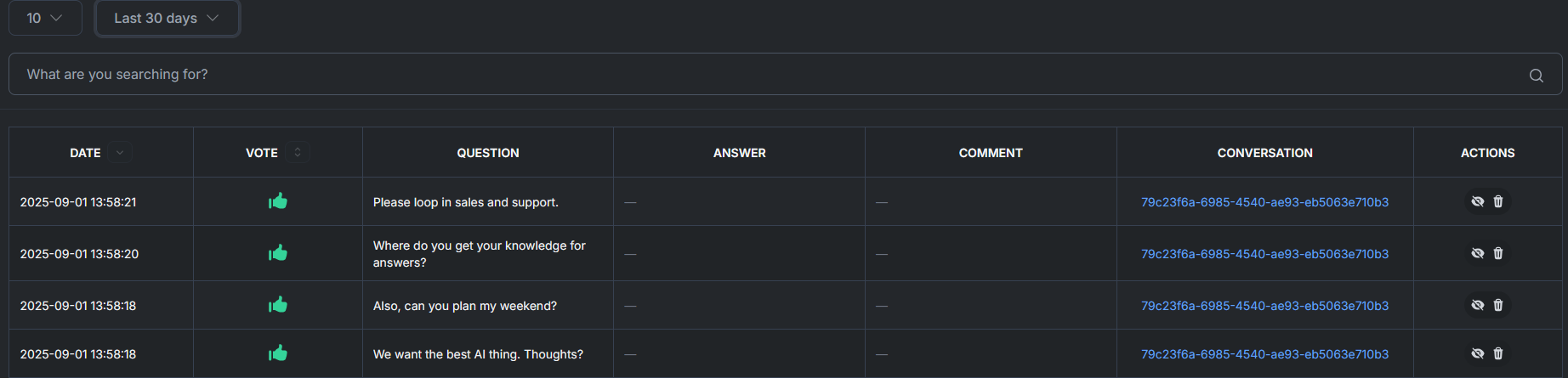
Inside the **Feedbacks** tab, administrators can:
* **Browse feedback records** in a sortable table showing
* **Date** of submission
* **Vote** (thumbs-up / thumbs-down)
* **Question** and **Answer** from the conversation
* **Comment** left by the user
* A **Conversation** link that opens the full chat directly
* **Search** feedback by keyword or filter by time period
* **Load more results** using the page-size selector at the top left of the table.
* Change the default (e.g., *10 per page*) to show more records at once.
* **Take action** on each record:
* **Ignore** to mark it as reviewed without exporting
* **Delete** to remove it entirely from the dataset
Each feedback entry is automatically compiled into a structured **JSON document** suitable for AI training and analytics.
### Configuration
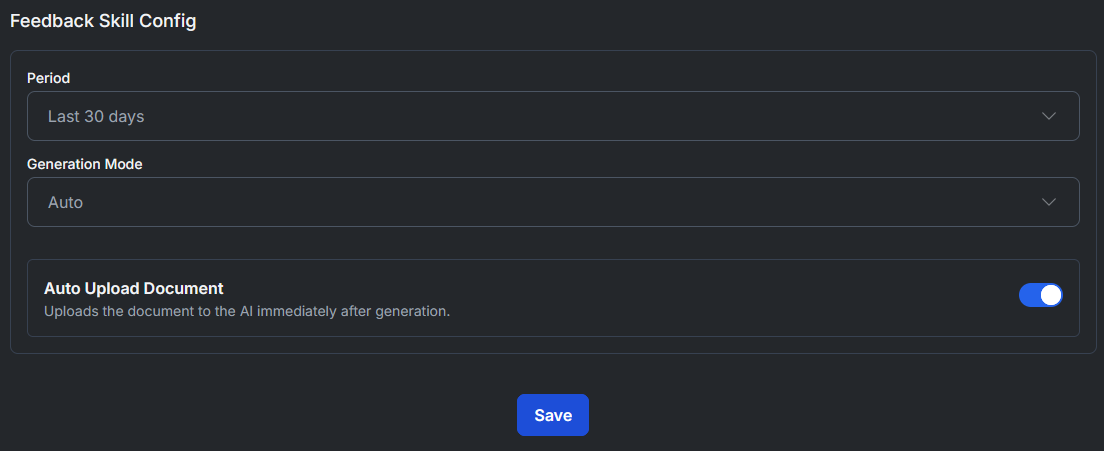
The **Feedback Skill Config** panel allows fine-tuning of how feedback is collected and delivered.
| Setting | Options | Description |
| ------------------------ | ----------------------------------------------------- | ----------------------------------------------------------------------------------------------------------------------------- |
| **Period** | Last 30 days · Last 60 days · Last 90 days · All time | Filters the feedback records by date range. |
| **Generation Mode** | Auto · Manual | **Auto** generates the feedback document automatically on schedule. **Manual** allows admins to trigger generation on demand. |
| **Auto Upload Document** | On / Off | When enabled, the generated feedback document is uploaded to the AI immediately after generation for training. |
---
# Agent Instructions
This documentation is published with GitBook. GitBook is the documentation platform designed so that both humans and AI agents can read, navigate, and reason over technical content effectively. Learn more at gitbook.com.
## Querying This Documentation
If you need additional information that is not directly available in this page, you can query the documentation dynamically by asking a question.
Perform an HTTP GET request on the current page URL with the `ask` query parameter, and the optional `goal` query parameter:
```
GET https://raia2.gitbook.io/raia/raia-cx/agent-skills/agent-feedback-skill.md?ask=&goal=
```
`ask` is the immediate question: it should be specific, self-contained, and written in natural language.
`goal` is optional and describes the broader end goal you are ultimately trying to accomplish on behalf of the user. GitBook uses it to tailor the answer towards what is most useful for that goal.
The response will contain a direct answer to the question and relevant excerpts and sources from the documentation.
Use this mechanism when the answer is not explicitly present in the current page, you need clarification or additional context, or you want to retrieve related documentation sections.